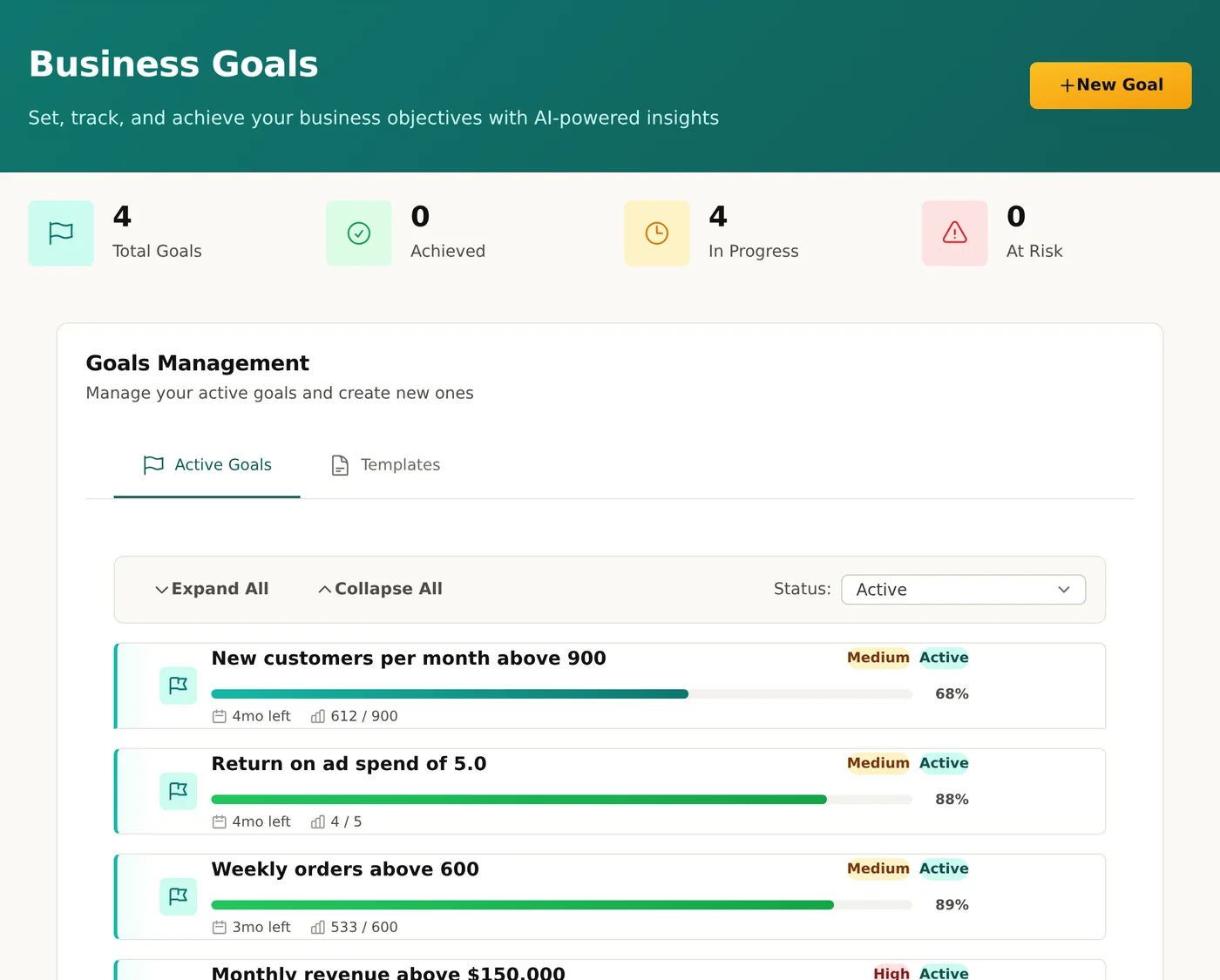
Goals and OKRs powered by your real data
Most OKR tools make you update progress by hand in a form or a spreadsheet. clariBI connects goals directly to your live dashboards, so the number that shows your MRR also drives the "MRR target" goal. Progress tracks itself.
Your OKR process is a spreadsheet graveyard
Teams spend more time updating OKRs than hitting them. Data lives in one tool, goals live in another, and by the time someone syncs them up the number is already stale.
clariBI fixes this by putting goals in the same place as the data that drives them. The dashboard is the source of truth. The goal is just a target line on top of it.
Manual updates nobody does
Weekly OKR check-ins turn into a chore. People fudge numbers or skip them entirely. By Q-end nobody trusts the dashboard.
Two sources of truth
Your BI tool says one thing, your OKR tool says another. Leadership meetings devolve into "whose numbers are right" instead of "what should we do."
No context when goals slip
A red goal is just a red goal. You can't drill in to see what drove the miss without opening five other tools and piecing it together.
Expensive add-ons for basic features
Dedicated OKR tools charge $8–$15 per user on top of your BI bill. For a feature that should come with the dashboard.
How Goals & OKRs work in clariBI
A thin layer on top of your live data. Not a separate tool to keep in sync.
Epic → Topic → Task hierarchy
Model the whole org's strategy as one tree. An Epic is a company-level outcome ("Q2 Revenue Target"). A Topic is a team-level contribution ("New ARR from Outbound"). A Task is the actual measurable unit ("12 closed deals by June 30").
Progress rolls up automatically. Finish a task and the parent Topic recalculates. Finish all the topics and the Epic is green. No manual summation, no broken SUMIF formulas.
- ✓ Unlimited tree depth — nest as deep as your org needs
- ✓ Weighted rollup when some tasks matter more than others
- ✓ Clone an entire tree for the next quarter in one click
Live data linking
Point a goal at any metric in any of your connected dashboards. The moment your Stripe sync updates, the goal updates. The moment your CRM logs a new closed-won, the goal updates.
This is the feature that makes everything else work. Because the goal reads from the same query as the dashboard, there is literally only one number. The dashboard and the goal cannot disagree.
- ✓ Link to any widget, any metric, any dashboard
- ✓ Refreshes on the same schedule as the data source
- ✓ Manual entry still supported for non-metric goals
Milestones with target dates
Break long-running goals into named checkpoints. "Ship the new pricing page by May 15." "Hit $500k MRR by June 30." Each milestone gets its own target date, status, and optional owner.
The milestone timeline gives you a quick read on "what's coming next this quarter" without opening the full goal tree. Perfect for weekly business reviews.
- ✓ Drag to reorder, click to mark complete
- ✓ Automatic slip detection based on pace
- ✓ Calendar view for a month-by-month read
AI insights and smart alerts
Every goal gets a plain-language explanation of why it's on track or off track, pulled from the underlying data. "New ARR accelerating 12% week-over-week, driven mostly by outbound."
Set alerts for when a goal slips below pace, accelerates sharply, or hits a milestone. Notifications land in-app and in email — no need to open clariBI to find out something changed.
- ✓ Natural-language "why is this changing?" explanations
- ✓ Per-goal thresholds and alert rules
- ✓ Digest mode — one summary per day, not a flood
Built for teams that live in the numbers
Real workflows, not just a feature list.
RevOps teams tracking pipeline health
Pipeline coverage, win rates, average deal size, velocity — the whole RevOps scorecard lives in clariBI already. Goals sit on top and turn those metrics into quarterly commitments you can defend in a board deck.
Bonus: when the forecast slips, the AI insight explains which stage is bottlenecking so you know where to push.
Engineering managers running OKR cycles
Link OKRs to deploy frequency, DORA metrics, incident counts, and feature-flag rollouts. The number eng cares about is the same number leadership sees, so there's nothing to translate at review time.
Run quarterly OKR cycles without a separate "OKR tool" that your ICs never log into.
Customer success with retention targets
Gross retention, net retention, logo churn, expansion rate — CS targets for the quarter. Link them to your CRM and billing data so you see which accounts are dragging the number down in real time.
Alerts fire when a key account slips, giving you a head start on the save.
Founder reviews and board prep
Founders running a monthly or quarterly board prep session can pull the entire goal tree into a shared workspace, let investors comment on specific milestones, and export a snapshot as a report.
No more rebuilding the same board deck from scratch every cycle.
Plays nicely with the rest of clariBI
Goals aren't a bolt-on — they share the same data sources, the same AI engine, and the same permission model as everything else in the platform.
Data Integrations
Link goals to live metrics from Stripe, HubSpot, Salesforce, Postgres, BigQuery, and more.
AI-Powered Analytics
The same AI that writes dashboard insights explains why a goal is on or off track.
Granular RBAC
Control who can create, edit, and view goals with the same 5-role permission system used everywhere else.
Included on every plan — Trial, Starter, Professional, and Enterprise. No add-on fee. No "goals module" upsell.
More than just targets
The things you'd want from a dedicated OKR tool, bundled with the BI tool your team already uses.
Historical snapshots
Every goal keeps a history of its progress values. Look back at how Q1 actually unfolded, compare to Q2 pace, and learn from the pattern.
Owner assignment
Assign each epic, topic, or task to a specific teammate. Their dashboard shows what they own. Weekly digests go to owners automatically.
Cycle management
Quarterly, monthly, or custom cycles. At cycle end, the whole goal tree gets archived and a new one starts. Compare cycle-over-cycle performance side by side.
Comment threads on goals
Discuss progress in context. Mention teammates to pull them in. Uses the same comment system as the rest of clariBI.
Visualize progress over time
Every goal gets an automatic progress chart. See the velocity, the trend, and the projected end state at a glance.
Permission-aware visibility
Goals respect RBAC. Teams see their own targets by default; leadership sees the whole tree. No accidental sharing of sensitive numbers.
Under the hood
clariBI goals are stored as structured records with a parent/child relationship forming the Epic → Topic → Task tree. Each node references either a static target value or a live dashboard widget query.
When a linked widget refreshes, the goal's cached progress value is recomputed and the rollup cascades up the tree. AI insights are generated on-demand when you open the goal or when a threshold alert fires.
The whole thing runs on the same Postgres database, the same Celery task queue, and the same permission model as dashboards and reports. There is no separate "goals database" to keep in sync.
Live refresh cadence
Goals refresh on the same schedule as their source widget. If the source refreshes every 15 minutes, the goal does too. Manual refresh is also available.
Alert pipeline
Background workers evaluate every active goal against its thresholds after each refresh. Alerts fan out to in-app notifications and email. Digest mode batches into one summary per day.
AI insight generation
When you request an insight, the AI engine reads the underlying data, the recent history, and the target, then explains the trajectory in plain language. Counts against your AI credit allowance.
Stop updating spreadsheets. Start hitting goals.
Connect a data source, set a target, and let the goal track itself. Free trial — no credit card.
Included on every plan, including the 14-day trial.
How we think about goals
The principles behind clariBI Goals & OKRs.
Goals live next to data, not beside it
A goal disconnected from live data is a wish. clariBI goals read from your dashboards so the number you target is the same number you measure. No sync, no translation, no "which version is right?"
Manual updates are a design smell
If the team has to remember to update a goal, they won't. The best process is the one that runs without human intervention. That's why live data linking is the flagship feature, not manual entry.
Included, not upsold
Goals are on every plan, including the free trial. They're not an add-on module. Because a BI tool without goal tracking is half a product, and we'd rather ship the whole product.
Goals & OKRs FAQ
Common questions about clariBI goals.
Is this really included on the free trial?
Yes. Every plan gets the full Goals & OKRs feature set: epic/topic/task hierarchy, live data linking, milestones, AI insights, and alerts. The 14-day trial is not limited in any way versus paid plans for this feature.
How is this different from a spreadsheet?
A spreadsheet requires someone to paste in the latest numbers. clariBI goals read directly from your connected data sources. If your Stripe sync ran an hour ago, your MRR goal is an hour fresh. The goal and the dashboard literally share the same query.
How do I link a goal to a live metric?
When creating or editing a goal, pick "Live metric" as the progress source, then select the dashboard widget you want to read from. clariBI reads the current value from the widget's underlying query. When the dashboard refreshes, the goal does too.
What if my data source goes down temporarily?
Goals display the last-known value and flag that the data source is stale. No data loss, no broken rollups. Once the source reconnects, the goal updates on the next refresh cycle.
Can I roll up goals across teams?
Yes. A company-level Epic can have Topics owned by different teams, each with its own Tasks. Progress rolls up from the lowest task to the top of the tree. Weighted rollup is supported when some contributions matter more than others.
Do I need to be on Professional to use it?
No. Goals & OKRs are available on every tier: Trial, Starter ($99/mo), Professional ($199/mo), and Enterprise ($999/mo). The difference between tiers is user count, AI credit allowance, and advanced features like RBAC — not goals.